
Verify Contractor License California: CSLB Lookup Guide
Step-by-step CSLB license verification guide for California. Check contractor status, workers' comp, bonds, and red flags before hiring any contractor.
In This Article
Before hiring any contractor in California, verifying their license is essential. This guide walks you through using the CSLB Check A License tool, understanding what each status means, and spotting red flags.
Why Verification Matters
California Business & Professions Code Section 7028 requires contractors performing work valued at $500 or more to hold a valid CSLB license (as of January 2025, AB 2622 raised this to $1,000 for certain projects). Hiring an unlicensed contractor puts you at risk:
- No consumer protections: The $25,000 CSLB Bond doesn't cover unlicensed work
- Personal liability: If a worker is injured on your property and the contractor has no workers' comp, you may be held liable
- Insurance denial: Your homeowners policy may deny claims for unlicensed work
- Permit problems: Building departments require valid license numbers—unpermitted work must be disclosed when you sell
- Limited recourse: While unlicensed contractors can't sue you for payment (B&P Code 7031), you'll struggle to recover damages from them
The penalties are real: Contractors caught working unlicensed face up to 6 months in jail and fines up to $5,000 under B&P Code 7028. Separate administrative penalties up to $15,000 may apply under B&P Code 7028.7. A second offense carries mandatory 90-day jail time.
Verification takes 2 minutes and can save you thousands in liability exposure.
Step-by-Step Verification
Use the official CSLB license lookup tool to verify any California contractor:
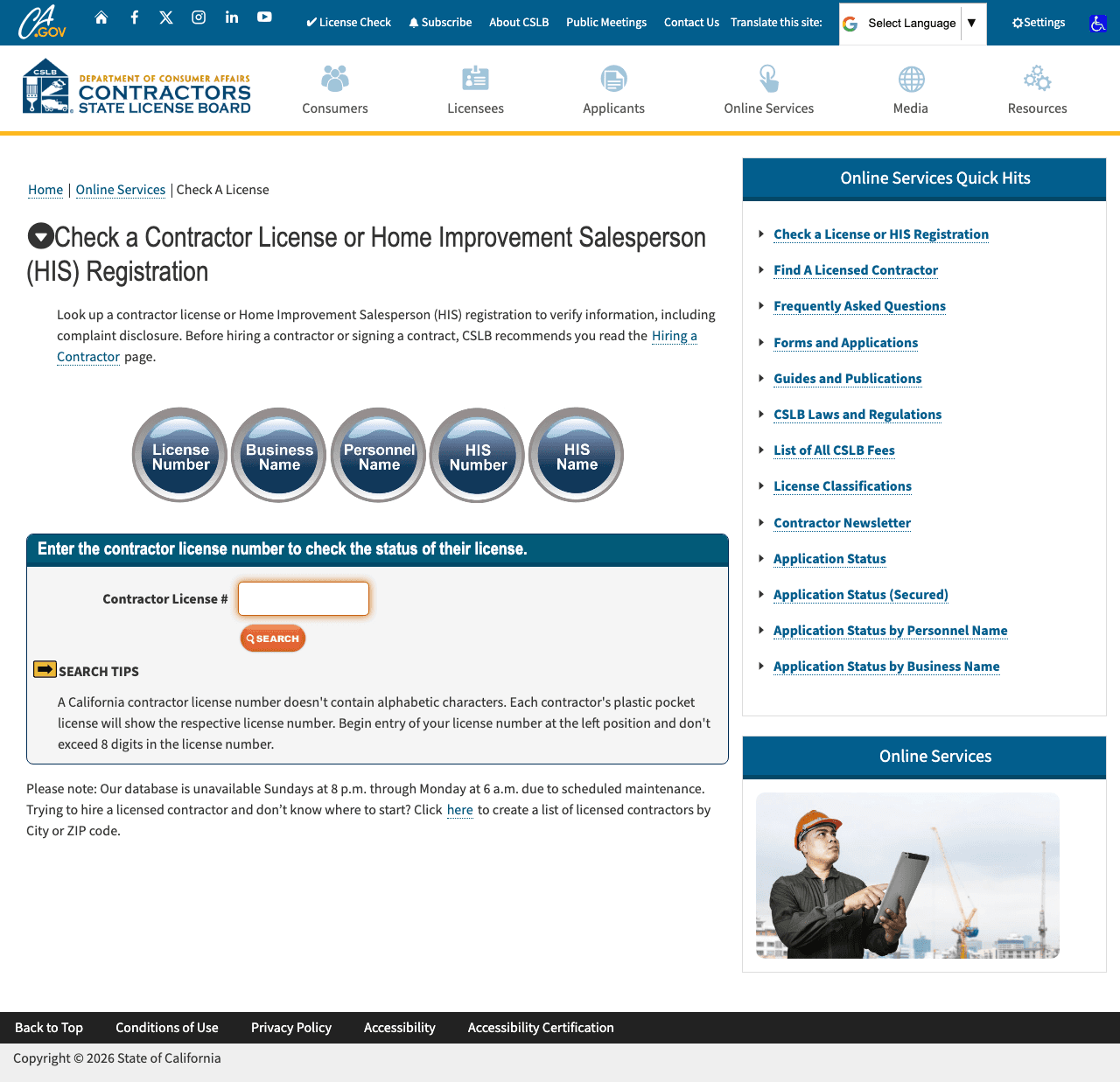
1. Go to CSLB Check A License
Visit CSLB Check A License (or search "CSLB license lookup" to find the official tool).
2. Enter Search Criteria
You can search by:
- License Number: Most precise search method
- Business Name: Partial matches allowed
- Personnel Name: Search by owner or qualifier name
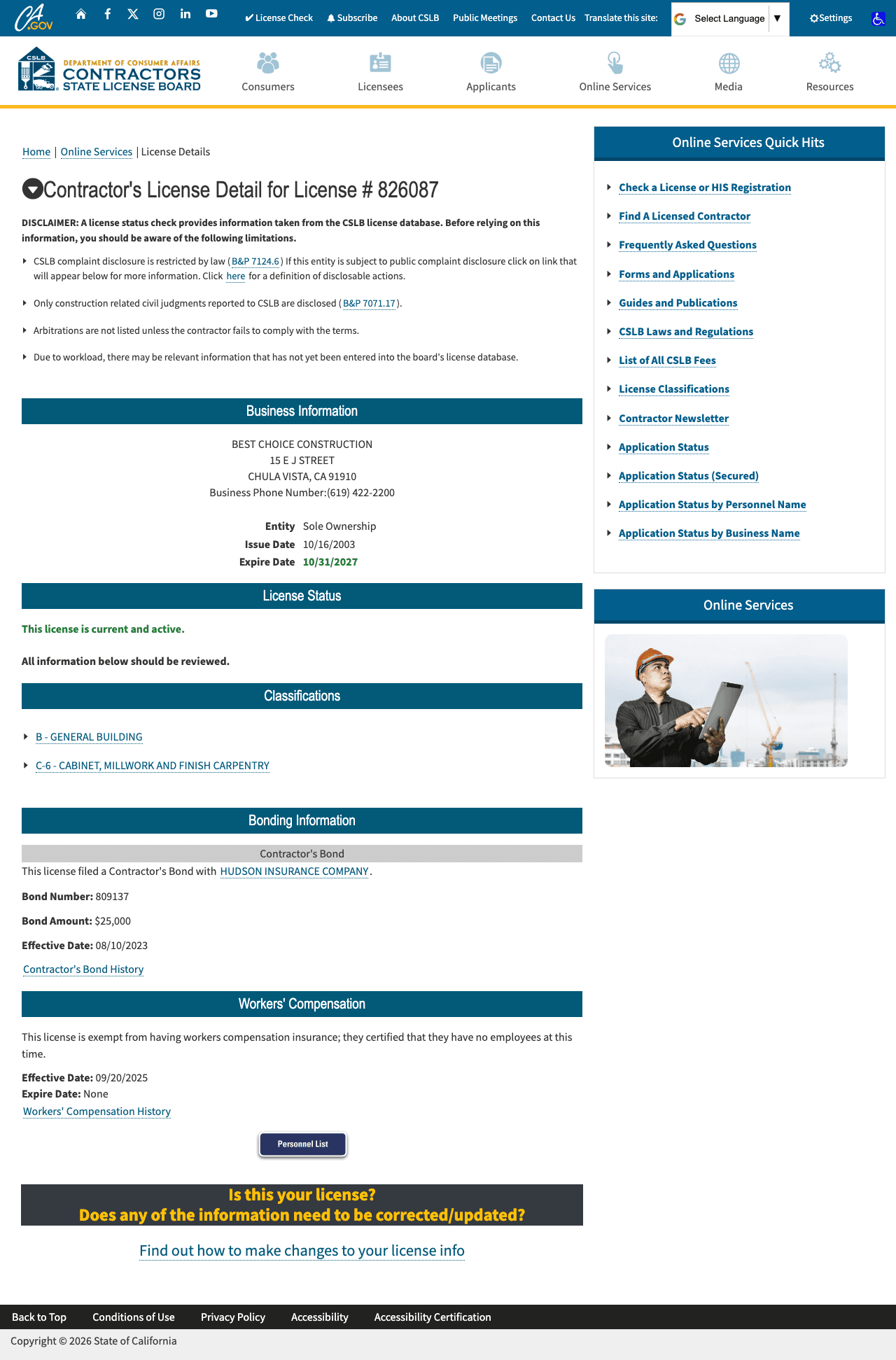
3. Review the License Record
The results page shows:
- License status (Active, Inactive, Expired, Suspended, Revoked)
- License classifications held
- Business entity information
- Workers' compensation status
- Bond information
- Any disciplinary actions
4. Check Workers' Comp and Bond
Click the detailed view to see workers' compensation coverage details and contractor bond information. Both should show current, valid coverage.
Understanding License Status
Active
The contractor is currently licensed and authorized to perform work in their classification(s). This is what you want to see.
Inactive
The license exists but is not currently valid for contracting work. Common reasons:
- Contractor voluntarily placed license on inactive status
- Business closed but license maintained for future use
Warning: Do not hire a contractor with an inactive license.
Expired
The license renewal was not completed by the deadline. The contractor cannot legally perform work until they renew and pay any late fees.
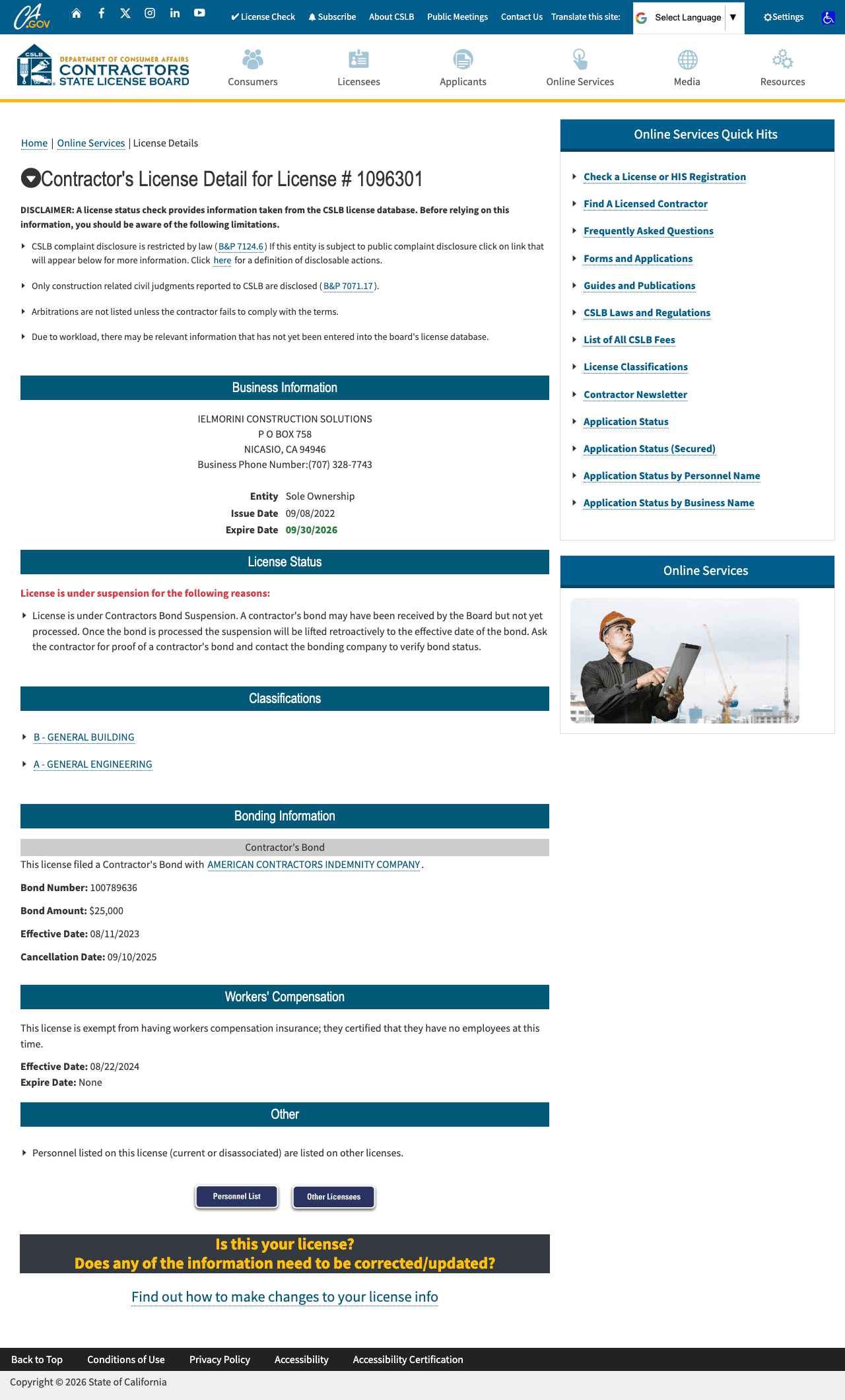
Suspended
The license has been suspended by CSLB, typically due to:
- Failure to maintain workers' compensation insurance
- Failure to maintain contractor bond
- Outstanding judgments or arbitration awards
- Disciplinary action
Red Flag: A suspended license indicates compliance problems.
Revoked
The license has been permanently revoked due to serious violations. This contractor cannot perform licensed work in California.
Workers' Comp Verification
The CSLB record shows one of three workers' compensation statuses:
- Certificate of Insurance on file: Shows insurer name, policy effective date, and expiration date
- Certification of Self-Insurance: Large contractors may self-insure through DIR
- Exemption Certificate on file: Contractor certified they have no employees
High-Risk Classifications That Cannot Be Exempt
Certain classifications are prohibited from filing workers' comp exemptions regardless of employee count due to elevated injury risk:
- C-8 Concrete
- C-20 HVAC
- C-22 Asbestos Abatement
- C-39 Roofing
- C-61/D-49 Tree Service
If a contractor in these classifications shows "Exempt", that's a major red flag.
When Exemptions Should Raise Questions
A workers' comp exemption can be legitimate for true sole proprietors. But ask yourself:
- Will they be bringing any workers to this job?
- Do they use regular subcontractors?
- Who is actually performing the labor?
If an "exempt" contractor shows up with a crew, they may be misclassifying employees— exposing you to liability. SB 1455 (effective January 1, 2028) will close this loophole by requiring all licensed contractors to maintain workers' comp coverage.
For details on workers' comp requirements, see our California Workers' Comp Requirements Guide.
What the Bond Covers (And What It Doesn't)
California requires all contractors to maintain a minimum $25,000 contractor bond (California Business & Professions Code Section 7071.6). But let's be realistic about what this means:
What It Covers
- Consumer damages from license law violations
- Substandard work and building code violations
- Unpaid wages to contractor's employees
- Unpaid subcontractors and suppliers (limited, first-come-first-served)
Reality Check
$25,000 sounds like protection until you realize a kitchen remodel in California starts at $40,000-80,000, and a bathroom remodel runs $15,000-30,000. The bond is essentially a licensing fee dressed up as consumer protection—it won't make you whole if a contractor walks off the job halfway through.
What the Bond Does NOT Cover
- Injury or property damage (that requires general liability insurance)
- Amounts exceeding $25,000
- Work performed by unlicensed contractors
LLCs must also post an additional $100,000 employee worker bond.
Beyond the License Check
A valid license is necessary but not sufficient for proper vetting. Also check:
- Federal databases: SAM.gov, OSHA, DOL, EPA records
- Insurance coverage: Request certificates of insurance (COI) with your company named as additional insured
- References: Contact recent clients on similar projects
- Safety record: Check EMR and OSHA violation history
For GCs Vetting Subcontractors
If you're a general contractor evaluating subs, dig deeper:
- License issue date: How long have they been licensed? 6 months vs. 15 years tells you a lot about track record.
- Personnel history: Has the RME/RMO changed recently? Why did the previous qualifier leave?
- Multiple licenses: Does the same qualifier appear on multiple licenses? How many jobs can they realistically supervise?
- Address stability: Multiple address changes in 3 years can indicate instability.
- Classification match: Make sure their license covers the specific scope of work—a B license doesn't authorize electrical work without a C-10.
For a complete vetting process, see our Subcontractor Prequalification Checklist.
Red Flags
License Red Flags
- License status other than "Active"
- License classification doesn't match the work you need (a B license doesn't authorize electrical work)
- License is very new (less than 1-2 years)—limited track record
- Recent reinstatement after suspension—what caused it?
- RME/RMO qualifies multiple licenses simultaneously ("rubber stamp qualifier")
- Personnel recently changed—did the previous qualifier leave due to problems?
Workers' Comp Red Flags
- Exemption on file but contractor shows up with a crew
- High-risk classification (C-8, C-20, C-39) showing exempt status
- Coverage expiration date is approaching or passed
Documentation Red Flags
- Business name doesn't match what they told you
- No physical address—only P.O. Box or virtual office
- Won't provide license number readily
- Disciplinary actions on record (even resolved ones deserve explanation)
Contract Red Flags
- Deposit exceeds $1,000 or 10% (whichever is less): California law (B&P Code 7159) limits down payments for home improvement contracts
- Contract lacks license number (required by law)
- Pushes for cash payment or "no permit" work
What to Do If You Find Problems
If the license check reveals issues:
- No license found: Ask the contractor for their license number again. If they can't provide one, do not hire them.
- Suspended/Expired: Ask when they expect to resolve the issue. Get it in writing before signing any contract.
- Disciplinary history: Ask the contractor to explain. Review the CSLB detailed report for specifics.
You can report unlicensed contractors or license misuse to CSLB at 1-800-321-CSLB.
FAQ
How often should I verify a contractor's license?
Verify before signing any contract. For ongoing relationships, verify at least annually and whenever you see the license number has changed.
Can a contractor with an inactive license pull permits?
No. Building departments verify license status. An inactive, suspended, or revoked license cannot be used for permits.
What if the license is under a different business name?
This is common with DBAs (doing business as). Verify the license is valid and the contractor can show documentation linking the names.
Is SiteVetter the same as CSLB lookup?
SiteVetter pulls the same CSLB license data plus additional federal sources (SAM.gov, OSHA, DOL, EPA) that CSLB does not check. We provide a single consolidated report for comprehensive vetting.
Additional Resources
Stop Wasting 47 Minutes Per Contractor
One search. Six data sources. 19 seconds.
CSLB + SAM.gov + OSHA + DOL + EPA + building permits—aggregated, timestamped, and ready for your compliance files.
Verify a Contractor NowCA Regulation Watch
Biweekly updates on the CA construction regulation changes that affect how you vet subs.
Free, biweekly. Unsubscribe anytime.